Essential Travel Apps for Italy: Maps, Trains, Translation & More
The Apps That Actually Matter in Italy
You don't need 30 apps. You need 6. These are the ones that work, that locals use, that will save you time, money, and frustration.
Italy isn't complicated to navigate — if you have the right tools.
Google Maps (Non-Negotiable)
Download offline maps before you go. This is the most important thing you'll do.
In Italy:
- Cell data can be spotty in rural areas and underground metros
- Offline maps work with no signal
- Walking navigation in Rome, Florence, Venice: flawless
- Transit routing: decent for buses and metros, unreliable for regional trains
How to download: Open Google Maps → search a city → tap the city name → "Download"
Download Rome, Florence, Milan, Venice separately. Each is about 150-200MB.
What Google Maps won't do: Book train tickets, tell you platform numbers, show real-time delays. For that you need the next app.
Trenitalia App (For Trains)
Italy's rail network is excellent. The app is... functional.
What it does:
- Book Frecciarossa (high-speed) and regional trains
- Show real-time platform numbers and delays
- Store tickets digitally (no printing needed)
- Cancellations and refunds
Pricing you'll see:
- Rome → Florence: €19-45 (Frecciarossa, 1h30)
- Milan → Venice: €15-39 (Frecciarossa, 2h30)
- Regional trains: €5-12 (slower, no reservation needed)
Tips:
- Book 30-60 days ahead for cheapest prices
- "Base" fare = no changes. "Economy" = changes for a fee. "Flex" = fully flexible
- Always validate regional train tickets at the yellow machines before boarding (€50 fine if you don't)
Alternative: Italo trains (italotreno.it) run the same high-speed routes, often cheaper. Check both.
Duolingo (For Italian Basics)
You don't need to speak Italian. But 10 phrases opens doors that English alone won't.
Start Duolingo 3-4 weeks before your trip. 10 minutes a day. Focus on:
- Greetings (buongiorno, buonasera, ciao)
- Food ordering (vorrei, per favore, il conto)
- Numbers (for prices and addresses)
- Directions (sinistra, destra, dritto)
Locals notice when you try. They switch to English immediately and help you — but they noticed you tried.
Google Translate (For Menus & Signs)
Camera mode is the killer feature. Point your phone at a menu in Italian, see it in English in real time.
Works on:
- Restaurant menus
- Street signs
- Museum descriptions
- Pharmacy labels
- Supermarket packaging
Download Italian language pack offline so it works without data.
Limitation: Italian food terms translate badly (what is "cicoria ripassata"?). Trust the waiter's description over the translation.
XE Currency (For Prices)
Simple. Open it, type the price in euros, see your home currency instantly.
Useful when:
- You're not sure if €28 for a taxi is fair (it might be)
- Comparing souvenir prices across shops
- Checking if your hotel is overcharging for breakfast (usually yes)
Alternative: Google "28 euros in dollars" works fine if you have data.
Trevurs (For Understanding What You're Looking At)
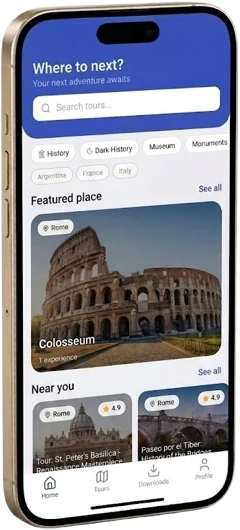
Download Trevurs before you arrive. It's the app that tells you what everything means.
Google Maps shows you the Colosseum is 600 meters away. Trevurs plays you an audio guide recorded by someone who has spent years understanding why it was built the way it was, what happened inside, and what the neighborhood around it looked like in 70 AD.
How to use it in Italy:
- Open the map in Rome, Florence, or Milan
- Tap a tour near where you're standing
- Put on headphones and walk
No tour group. No fixed schedule. No €25 guided tour fee. Just you, the city, and context that makes everything click.
Works offline once you've downloaded the tour. Important for Venice's spotty signal.
Bonus: What You Don't Need
- TripAdvisor: Good for restaurant reviews, but Google Maps reviews are equally useful and already on your phone
- Airbnb app: Fine, but most Italian accommodation is on Booking.com
- A VPN: Not needed in Italy
- WhatsApp: Already on your phone, works for Italian restaurant reservations (many small places accept WhatsApp bookings)
Six apps. Offline maps downloaded. Italian language pack installed. You're ready.